
UQuerySelect
UQuerySelect is an in-editor selection tool for Unity that is lightweight and allows for easy search and replace of in-scene GameObjects.
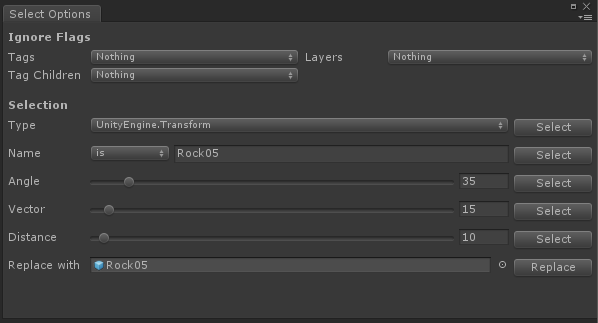
Features
- Select by component type
- Filter by name with is or contains
- Filter by various properties given any items selected in scene
- Replace with another GameObject or Prefab
Basic Use
After installing UQuerySelect, you can open it from Tools/Query Select or use the Keyboard Shortcut Alt-S.
To Use UQuerySelect, select any GameObject in your Unity Scene. Then, select desired filters. Finally, click the Select Button for the type of query you want to make.
All GameObjects in the Scene matching that query will be selected.
Manual
Ignore Flags
You can select Project Tags and Layers and the query will ignore the selected groups.
- Tags - GameObjects with these tags will be excluded from the query results.
- Tag Children - Select any tags you want GameObject Children to ignore. i.e. every bone in the Player skeleton, does not need to be tagged
Player. You can set the Tag ChildrenPlayerand all of players children are ignored regardless of their tag. - Layers - GameObjects on these layers will be excluded from query results.
Selection
Only one at a time can be selected.
- Type - Select all GameObjects with same Component Type
- Name - Select all GameObject with matching name
- is - Matches query string exactly
- contains - Contains the query string
- Angle - Maximum range of Angles any one Vector is turned
- Vector - Maximum offset of Direction from the direction selected GameObject is facing
- Distance - Good ol’ radial distance from object
Replace
Replaces the selected GameObjects with a prefab or another object in scene.
Install
- Download the repository.
- Unzip
- Add
UQuerySelectto your Assets folder.